
要約:
Google is rolling out an enhanced autofill feature powered by artificial intelligence for the Chrome browser. Gemini とそのパーソナル インテリジェンス機能を使用して、Chrome はユーザーの Gmail メールボックスから関連情報を取得し、Web フォームに記入するときに積極的に提案を提供できるようになりました。ユーザーは、タブを切り替えたり、確認メールを検索したり、購入レシートを調べたりする代わりに、手動で見つけて入力する必要がある情報を完了する機会が得られます。
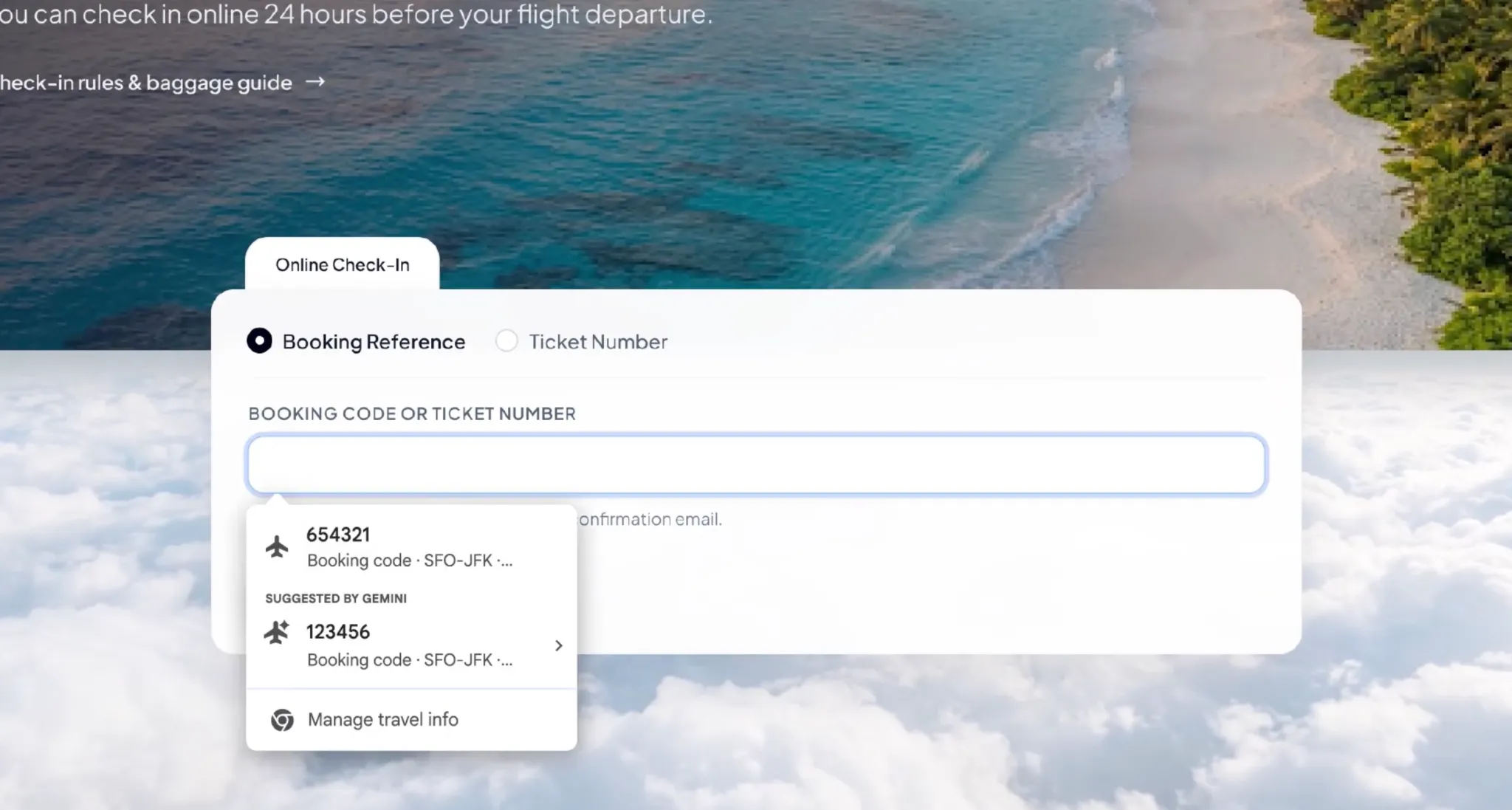
この新機能は、Chrome の元の自動入力機能を拡張します。以前は、ブラウザーは主に、名前、住所、電話番号、クレジット カード情報などの一般的なコンテンツを入力する役割を担っていました。このアップグレード後は、注文番号、荷物追跡番号、フライト予約情報、その他の情報を Gmail から検索し、現在の Web フォームの特定のニーズに基づいて対応する提案を提供することもできます。
For example, when a user checks a package on a logistics website, Chrome can try to find the logistics tracking number from the shipping notification or order confirmation email in Gmail;フライトにチェックインするときに、ブラウザは航空会社の確認メールから予約番号または関連する旅程情報を抽出できます。 Users no longer need to open their mailbox, search for messages, and then copy the found numbers to another web page.
この機能は、Gemini と Personal Intelligence の統合に依存しています。パーソナル インテリジェンスは、関連する Google サービスからの情報を使用して、ユーザーの承認を得て、特定のタスクに対してパーソナライズされたヘルプを提供できます。今回のアップデートでは、この機能がブラウザのフォーム入力プロセスにさらに組み込まれ、AI が質問に答えるだけでなく、ユーザーが日常のネットワーク操作を行う際に即座に情報を照合できるようになります。
現在のフォームに特定の情報が必要である可能性があることを Chrome が認識すると、Gemini によって提供される提案が自動入力メニューに表示されます。ユーザーはブラウザの自動入力だけに頼るのではなく、提案を表示して、それを使用するかどうかを選択できます。関連する提案には情報のソースも表示され、コンテンツが現在のタスクと一致しているかどうかをユーザーが確認できるようになります。
Google によると、この機能は米国のユーザーへの展開が開始されており、デスクトップ版 Chrome に加え、iOS および Android プラットフォーム上の Chrome で Gemini 機能を使用しているユーザーにも適用可能です。 Users need to enable Personal Intelligence-related features to use the enhanced autofill experience that extracts information from Gmail.今回、すべての Chrome ユーザーがこの機能をすぐに利用できるわけではなく、実際に利用できるかどうかは、アカウントの資格、関連設定、段階的なプッシュの進行状況によって異なります。
プライバシー保護の観点から、Google は、自動入力に含まれる機密情報は暗号化されており、この機能を有効にするかどうか、およびどのような情報にアクセスできるかをユーザーが制御できることを強調しました。 Users can also delete unwanted suggestions or simply turn off enhanced autofill.
However, the upgrade still sparked discussion about the scope of use of personal data. Gmail メールボックスには、買い物記録、旅行計画、請求書、注文確認、その他の機密通信を含む大量の個人情報が含まれることがよくあります。ブラウザーが現在の Web ページに基づいてこれらのコンテンツを自動的に取得できると、ユーザーは利便性が高まりますが、どのデータが読み取られるのか、いつ呼び出されるのか、関連するアクセス許可をどのように制限するのかを明確に理解する必要もあります。
Google said that users can manage the enhanced Autofill feature and its data access through Chrome settings.ただし、この機能がさまざまなシナリオで電子メールを選択する方法、特定の情報が現在のフォームに関連するかどうかを判断する方法、および提案にどのような情報が表示されるかをさらに理解するには、ユーザーは実際の使用経験と設定手順に頼る必要があります。
Google は、将来的には拡張オートコンプリートの情報ソースを拡大し、Google フォトから画像に含まれる関連情報を安全に抽出できるようにする予定です。これは、将来的には、ブラウザーが電子メール内の情報を検索することに限定されず、ユーザーが保存された画像からフォームに記入するために必要なコンテンツを取得できるようになる可能性があることを意味します。 However, this expanded feature has not yet been fully rolled out with this update.
Chrome は近年、自動入力機能の対象範囲を拡大し続けています。 2025 年に、Google はよりスマートなフォーム理解機能をブラウザーに追加し、パスポート番号、運転免許証情報、車両識別番号などの複雑なデータを処理できるようにしました。 2026 年には、同社はいくつかの高度な自動入力機能をモバイル デバイスに拡張し、Chrome と Google ウォレットの統合を強化する予定です。
今回の Gmail 統合により、「ユーザーが保存した情報の記憶」から「現在のタスクに基づいて関連サービスから必要な情報を検索」へと自動入力がさらに進化します。 This is also part of Google's attempt to integrate Gemini into daily software usage scenarios: artificial intelligence no longer only exists in independent chat windows, but has gradually become the underlying capabilities in browsers, emails, and other applications responsible for understanding context, extracting information, and performing auxiliary operations.
For users who frequently shop online, travel for business, or process a large number of orders, this update is expected to reduce repetitive operations, especially for scenarios where frequent switching between email and websites is required. However, whether it can accurately identify form fields on different websites, whether it will mistakenly select expired orders or similar booking information, and whether users can easily control the scope of data access will still determine the value of this feature in actual use.
In general, Google's update does not simply add several auto-fill data types, but allows Chrome to start using contextual information in the user's mailbox to actively assist in completing tasks. As artificial intelligence becomes more integrated with browsers, emails, and cloud services, automatic form filling is expected to evolve from a traditional information memory tool to an intelligent assistant that can understand task requirements and retrieve relevant information. At the same time, how to strike a balance between convenience, accuracy and personal data control will also become an issue that must be faced as such functions continue to become more popular.
コメント